Written by Mitha Shameer
Content Specialist, Esko
Throughout history, reviews have existed to keep bad ideas from reaching the real world. Cathedrals were checked by master builders, factories by engineers, and today we have legal and compliance teams for packaging. It’s safe to say that reviews evolved from protecting budgets, reputations, and people to also safeguarding customers’ and regulators’ trust.
In modern marketing and packaging teams, that same protective instinct shows up as long compliance queues, redlines, and last‑minute copy changes during artwork and compliance reviews. The intent is right, but the timing is wrong, as problems are often discovered only after designers export final files.
AI‑powered compliance checks help teams get ahead by spotting non‑compliant language directly inside the design workflow, so designers can fix issues before handoff. The result is a continuation of centuries‑old review practices. Only now, errors (both brand and compliance-related) are caught earlier, faster, and with far fewer painful rounds.
The Reality of Rule-Heavy Packaging
Modern packaging design is rarely simple. Even a single product can have dozens (and sometimes hundreds) of label variations across regions, product sizes, and seasonal campaigns. Each version carries its own set of requirements: ingredients, nutritional information, expiry formats, allergen warnings, barcode standards, and marketing claims.
On top of that, regulatory rules aren’t static. Updates arrive frequently, and different markets interpret them differently. A claim that passes in one country might be disallowed in another. Designers and compliance teams are left dealing with constantly changing rules, trying to ensure every label is accurate, compliant, and consistent with brand guidelines.
In fact, in just the first quarter of 2025, the FDA recorded 45 food and beverage recalls, and nearly half were due to undeclared allergens like milk, shellfish, nuts, wheat, soy, or sesame. Even major brands such as Frito-Lay, Nestlé, Quaker, and Trader Joe’s were affected.
The result is a growing web of checks and approvals. Traditional manual processes struggle to keep up, which increases the chance of errors slipping through, whether it’s a missing allergen, an outdated logo, or a non-compliant claim. Teams end up spending more time verifying details than creating impactful packaging.
How Early Compliance Checks Save Time and Trust
Traditionally, compliance in packaging design meant waiting until after a designer finalized and exported artwork, when legal and regulatory teams manually comb through every label and claim. No doubt, it has historically been a time-consuming bottleneck that slows down your packaging timelines with multiple manual reviews and approvals that take forever.
By embedding AI‑led compliance checks directly within the design workflow, Esko’s Comply module allows designers to catch brand inconsistencies, formatting issues, and any regulatory non-compliance before exporting files. This way, you significantly cut down on reviews, as you’re already one step ahead of the review cycle. Plus, making things automated and aligned leaves little room for errors.
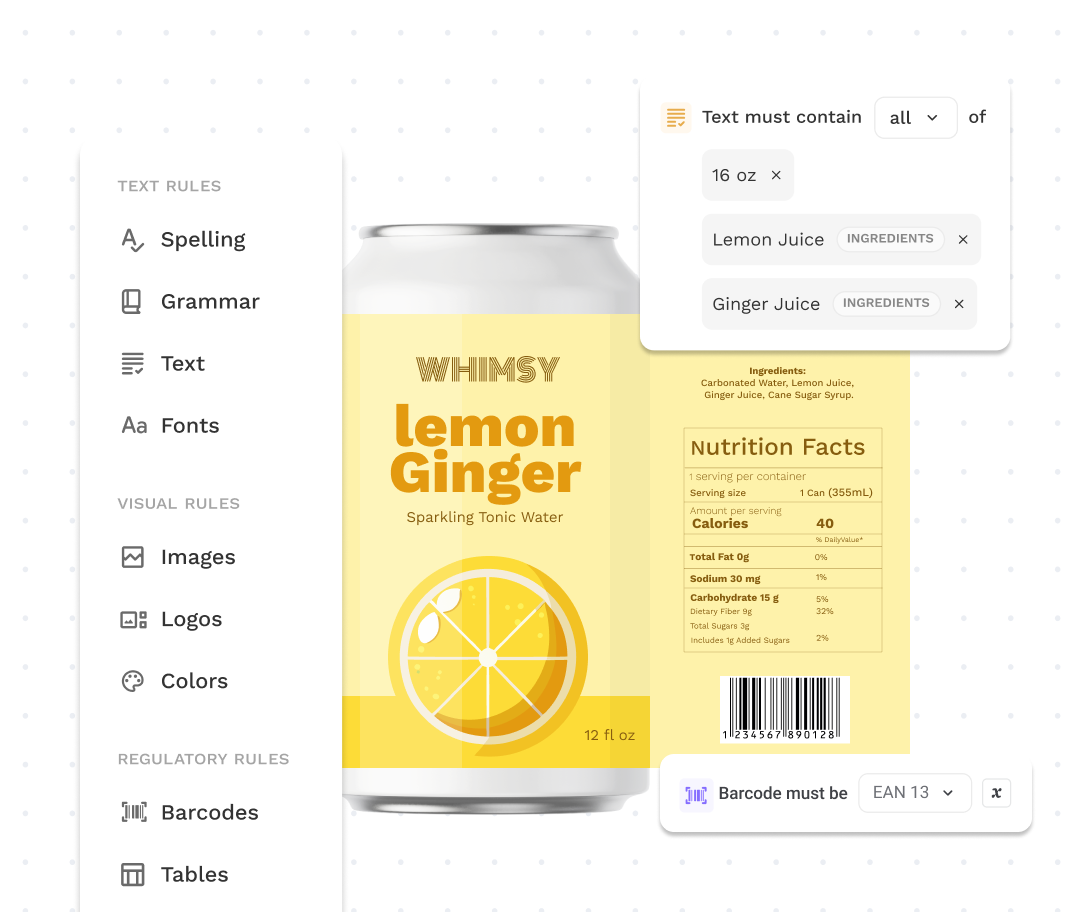
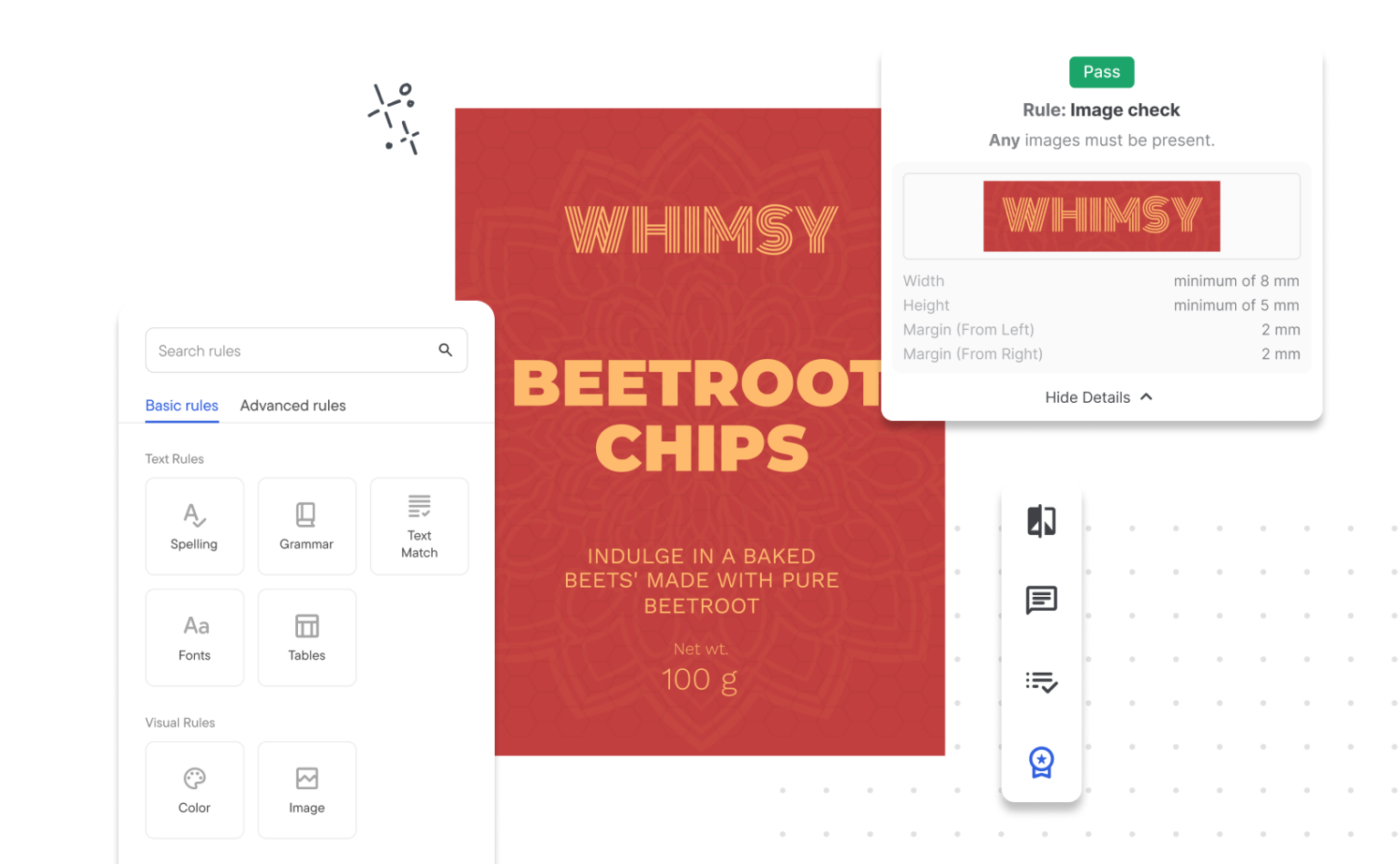
With custom rulebooks defining what “correct” looks like for text, formatting, barcodes, logos, and symbols, Comply automatically scans artwork files for any deviations. It identifies missing allergens, incorrect barcodes, disallowed fonts or cases, and non-compliant claims before the file ever leaves the design tool. This means designers receive flagged exceptions in real-time, empowering them to correct issues early.
This step not only significantly cuts down review time by reducing back-and-forth between design and legal teams but also lowers risk by catching errors before costly prints or recalls occur.
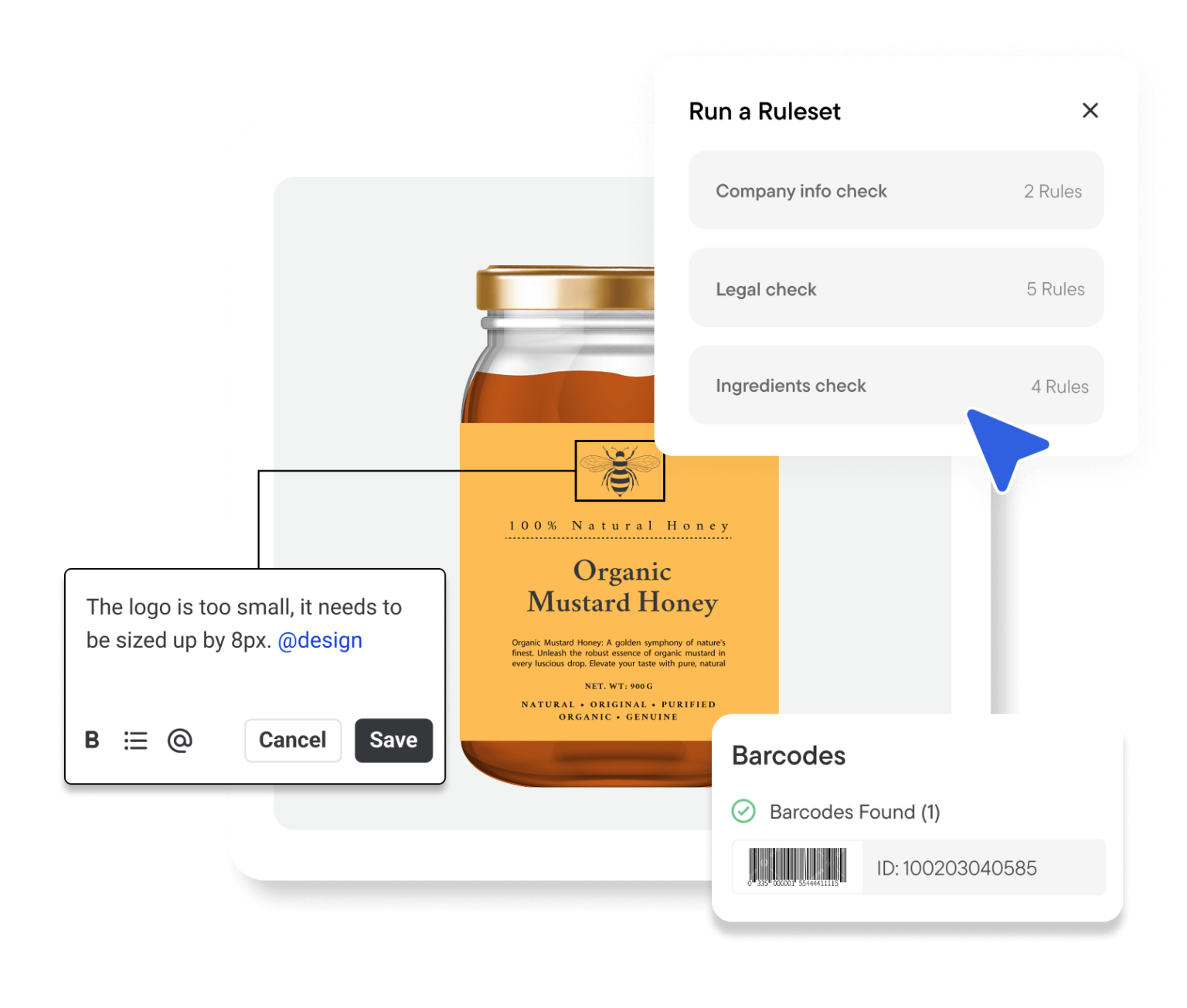
With Comply, your design team is confident that the artwork meets standards right from the start, enabling faster go-to-market times and freeing them to focus on innovation. It also supports collaborative reviews with contextual annotations, helping cross-functional teams resolve issues quickly.
Why Real-Time Validation Matters
Designing labels isn’t just about visuals. You need to make sure that every claim, symbol, and piece of text is accurate, compliant, and on-brand. The challenge is that even small mistakes can have big consequences, from regulatory scrutiny to lost customer trust.
AI-powered real-time validation gives designers immediate feedback while they work, shifting the focus from manual checks to creative problem-solving. This approach brings several tangible benefits:
- Make confident choices: Designers can experiment with layouts, copy, and packaging elements without second-guessing whether a regulatory rule is being broken.
- Focus on quality, not just correctness: With the basics automatically checked, attention shifts to creativity, clarity, and brand alignment.
- Reduce cognitive load: Designers don’t need to remember every regulation or guideline as AI flags what matters when it matters.
- Encourage collaboration and alignment: Teams work from the same real-time insights, preventing miscommunication and ensuring consistency across SKUs and markets.
- Speeds up review cycles: By catching issues as they happen, designers reduce the back-and-forth with legal, regulatory, and marketing teams.
- Lowers risk of costly errors: Missing allergens, incorrect barcodes, or disallowed claims are flagged before files are exported, reducing the chance of reprints or product recalls.
The Role of AI in Packaging Compliance and How Comply Makes It Work
To understand why early compliance checks matter, it helps to look at how AI actually fits into a designer’s workflow. Many of the slow, manual steps that once defined review cycles such as scanning PDFs, cross-checking spreadsheets, and searching for rule changes are increasingly unnecessary when intelligence is built directly into the process.
Within WebCenter Go (and soon WebCenter Enterprise), Esko’s Comply module makes AI an integral part of the label-creation process. Its impact on packaging isn’t dramatic at first glance, but the small time-saving moments add up.
Here’s how the compliance sequence works and why manual processes simply can’t keep up anymore:
1. Design Input: Seeing the Full Picture, Instantly
Designers upload artwork directly into WebCenter Go or WebCenter Enterprise.
Comply reads text, layout structure, symbols, claims, ingredient lists, and other elements that would typically require slow, line-by-line human review.
Why it matters:
Manual review can take hours per SKU. AI does the first sweep in seconds, ensuring no early-stage errors slip through unnoticed.
2. Compatible with Multiple Regulatory Frameworks
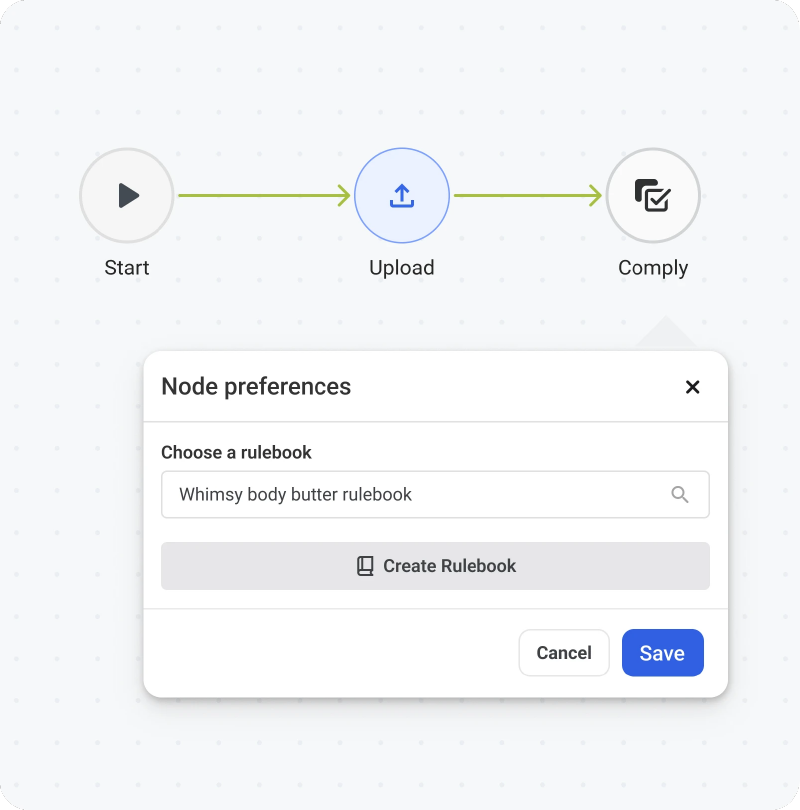
Comply works with rulebooks maintained by project managers or regulatory teams, and is compatible with multiple regulations across regions and industries.
Why it matters:
Instead of digging through PDFs or outdated internal docs, teams work from a single, curated source of truth. Regulatory teams stay in control of the rulebooks, and designers get instant clarity on what applies to the label they’re working on without second-guessing or waiting for reviews.
3. Automated Compliance Analysis Across Markets
Comply scans artwork against the relevant rulebook and market requirements:
- Mandatory text and claim validations
- Allergen checks (undeclared, misplaced, or low-contrast warnings)
- Font hierarchy and sizing
- Nutrition panel formats
- INCI naming for cosmetics
- Multi-language requirements for cross-border packs
- Legal symbol placement
- Color contrast for readability
- Barcode positioning and safe zones
- Jurisdiction-specific warnings and disclaimers
Why it matters:
A single overlooked detail, like a missing allergen or incorrect claim, can trigger a costly recall. Comply sweeps through thousands of rules in seconds, far faster than any manual process.
4. Industry-Specific Smart Checks
Comply works with rulebooks created and maintained by your team for each product category.
- Cosmetics ingredient lists
- F&B nutrition and labeling standards
- Alcohol ABV formatting and disclaimers
- Supplement panel requirements
- Multi-panel layouts, front-of-pack vs. back-of-pack rules
Why it matters:
Packaging compliance isn’t one-size-fits-all. By using category-specific rulebooks, Comply ensures every label is checked against the exact rules that matter, something spreadsheets or generic workflows can’t replicate.
5. Customizable Compliance Checklists
Teams can tailor checklists to meet brand, legal, or regulatory needs, covering:
- Logo placement and brand colors
- Legal disclaimers
- Marketing copy approvals
- Internal do-not-use claims
- Pack hierarchy rules
Why it matters:
AI doesn’t override brand governance; it reinforces it. Designers always work within the guardrails while reducing manual checks.
6. Clear, Audit-Ready Compliance Reports
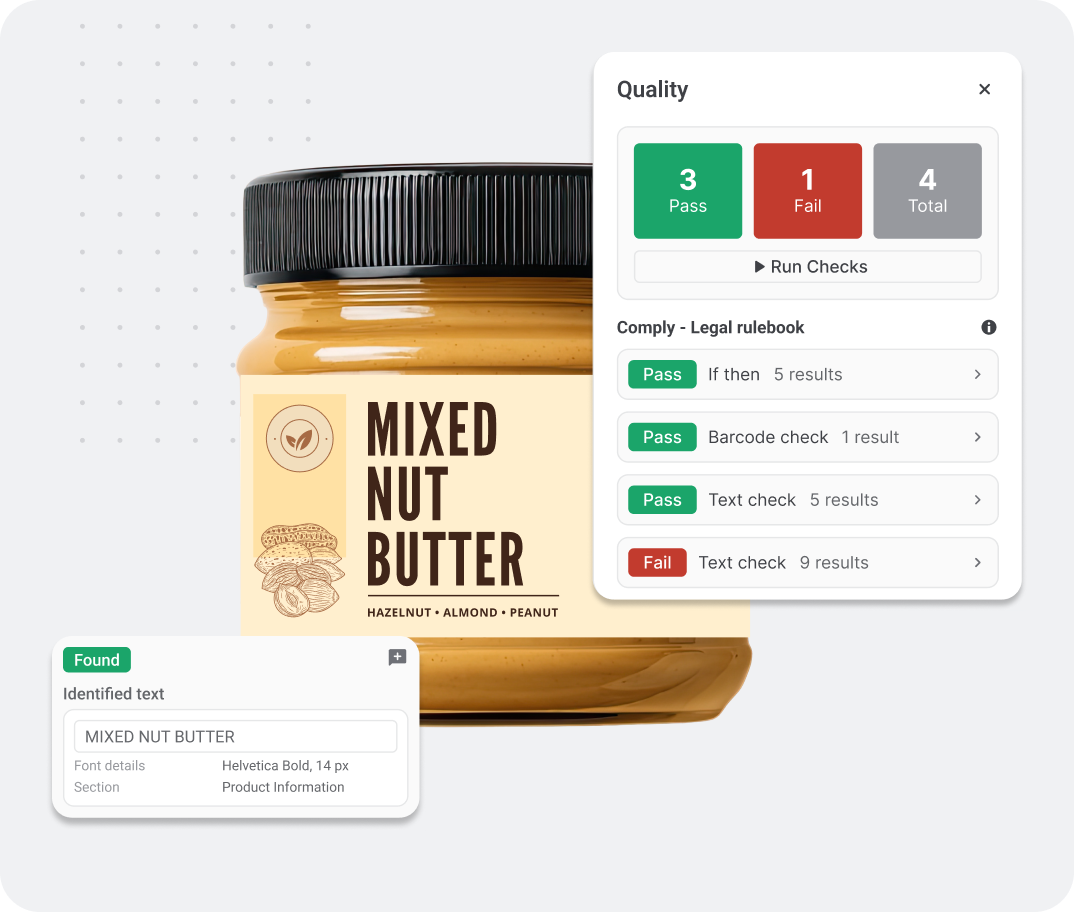
After each analysis, Comply generates a structured report that shows:
- Which checks passed and which failed
- Why a check failed (e.g., missing allergen, incorrect claim, formatting issue)
- What the correct result should be to meet brand and regulatory standards
Reports plug directly into WebCenter workflows — no juggling multiple tools or exporting files.
Why it matters:
Teams get full visibility into compliance issues with clear guidance on fixes, making audits, legal reviews, and final approvals faster and more reliable.
7. Works Within WebCenter Workflows
Comply fits seamlessly into your existing workflow, moving from upload to AI-led compliance check, then reviewer validation, followed by final approval, and finally producing print-ready output.
Why it matters:
Compliance is no longer a late-stage hurdle. It becomes continuous, early, and proactive, freeing designers to focus on innovation rather than repetitive checks.
Why AI Makes Comply the Next Step
What once took hours of scrolling through PDFs and cross-checking annexes now takes minutes. With the repetitive, error-prone work handled earlier and faster:
- Designers spend less time policing compliance.
- Teams experience fewer back-and-forth loops between design and legal.
- The path from concept to approved artwork becomes smoother and faster.
This is exactly the problem Esko’s Comply module solves. By embedding these capabilities directly into WebCenter, Comply gives teams the clarity and speed to make better calls without losing control.
In the end, the goal is the same: fewer errors, faster approvals, and a workflow where people spend less time checking boxes and more time shaping the parts of packaging that truly matter.
Curious about what Comply and AI can do for your team? Book some time with our team to see WebCenter Go in action.