

The packaging teams I meet are managing more packaging changes while keeping up with evolving regulations and demanding deadlines. Many of them remember what that work was like before WebCenter, and they’re very clear about the difference it makes.
WebCenter gives them visibility into the workload and specialized tools to handle it. Some customers tell me they would need more people to keep up without it.
At Shell, Laurens Tytgat, Process Expert Lead, shared 40 reasons why WebCenter makes his workday brighter. His examples range from keeping revisions moving to knowing exactly which file was approved. For the people doing this work every day, the value is practical.
Yet I still encounter discussions about replacing WebCenter with a general enterprise platform. These conversations often start outside the packaging team, driven by a reasonable ambition to consolidate suppliers and reduce costs. On a feature list, the systems can look similar: both store files, assign tasks, and track approvals.
The difference is in what happens beyond those basic functions.
WebCenter brings packaging-specific inspection, content, and approval controls into a connected process. A general workflow platform needs those capabilities provided another way—and the relationships between them maintained. That work belongs in the cost comparison alongside software licenses.
Reviewing Artwork for Production
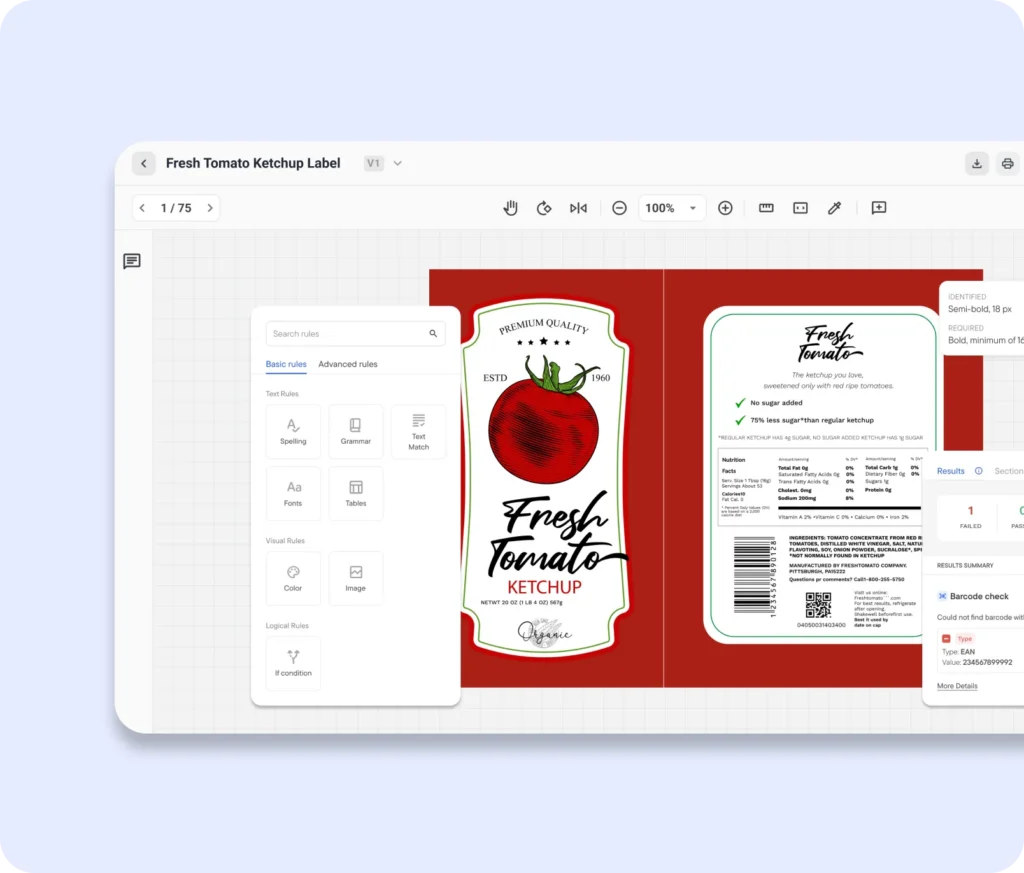
At first glance, packaging artwork can look like any other graphic. The artwork may need to work across several inks, substrates, printing processes, and markets.
Each ink must align with the others, and the printed image must fit the package structure. The content must also meet company guidelines and the requirements of each market.
The Esko Viewer gives reviewers access to production details that aren’t visible in a standard PDF preview. They can inspect individual ink separations and measure text directly in the artwork.
Packaging-specific rendering also accounts for ink characteristics that a standard PDF preview may not show, helping reviewers assess how the file is intended to print.
Artwork is usually reviewed flat, although the finished pack will be folded or assembled. WebCenter’s 3D view places the graphics on the package shape using the production dieline or structural design. Reviewers can turn the pack around and see how the artwork comes together before approving it.
Understanding the Impact of a Change
Changing a few words on a pack can affect much more than the wording. Translations may need updating, market requirements may need reassessing, and the revised artwork may require changes to its ink separations. Those consequences can extend across multiple packaging variants.
WebCenter Content Management links approved content to the artwork and projects that use it. Teams can search for that content and see where it appears, making it easier to identify which artwork may be affected by a change.
These relationships help teams establish which packs need attention and carry out the changes through the appropriate reviews. In some cases, getting that assessment right is also a matter of consumer safety. Missing allergen information, for example, can put consumers at risk. The correct information must appear on every affected pack.
Building Quality Assurance into Every Revision

An edit can correct one line of copy and accidentally change another. If the problem is caught only at final approval, the file may have to repeat reviews that everyone thought were complete.
Inspecting the artwork after every revision reduces the risk, but doing so manually is slow, repetitive, and expensive. With Esko Verify Comply configured into the workflow, each newly submitted version can be checked against defined packaging rules and approved reference content. Failed checks can return the file to the submitter for correction and rechecking.
WebCenter manages revisions as versions of a document, presenting the latest version while keeping earlier history available. Configured approval gates control whether artwork can move forward or be released. The checks and correction loops operate within that managed process, rather than leaving people to coordinate each inspection separately.
This brings quality assurance into the workflow rather than leaving it until final approval. Teams can catch problems before they reach further reviews, while people remain responsible for interpreting exceptions and approving the result.
Why the Connections Matter

Keeping packaging in WebCenter does not isolate it from the rest of the business. Through configured integrations, WebCenter shares progress and approved files with other enterprise systems. Packaging teams retain their specialized tools, while colleagues follow the work through the systems they already use.
These connections also matter to the future of automation. I see a significant opportunity for AI to help assess the wider consequences of a packaging change. This requires access to the relevant content, artwork relationships, and production requirements. The more context those systems have about the content, artwork, and production requirements involved, the more useful the automation becomes.
For anyone evaluating a packaging system, that is an important distinction. The assessment must cover more than whether a platform can store files, route tasks, and manage approvals. It should consider how a packaging change will be identified, checked, and carried through to approved artwork, and what it takes to maintain those connections as the business evolves.
That is what I hear reflected when customers talk about the value of WebCenter. It gives packaging teams the specialized tools and context they need to inspect artwork properly, apply requirements consistently, and manage changes through to production. The technology supports the process, while leaving the decisions that require packaging expertise in the hands of the people who know it best.